For development purposes I wanted to install Oracle Database 12c Enterprise Edition to Vagrant box so that I could play with it. It should’ve gone quite straight forwardly but in my case things got complicated although I had Oracle Linux and the pre-requirements fulfilled. Everything went fine until it was time to run the DBCA and create the database.
The DBCA gave “ORA-12547: TNS: lost contact” error which is quite common. Google gave me couple of resources to debug the issue. Oracle DBA Blog explained common issues which cause ORA-12547 and solutions to fix it.
One of the suggested solutions was to check to ensure that the following two files are not 0 bytes:
ls -lt $ORACLE_HOME/bin/oracle
ls -lt $ORACLE_HOME/rdbms/lib/config.o
And true, my oracle binary was 0 bytes
-rwsr-s--x 1 oracle oinstall 0 Jul 7 2014 /u01/app/oracle/product/12.1.0/dbhome_1/bin/oracleTo fix the binary you need to relink it and to do that rename the following file:
$ cd $ORACLE_HOME/rdbms/lib
$ mv config.o config.o.bad
Then, shutdown the database and listener and then “relink all”
$ relink allIf just things were that easy. Unfortunately relinking ended on error:
[oracle@oradb12c lib]$ relink all
/u01/app/oracle/product/12.1.0/dbhome_1/bin/relink: line 168: 13794 Segmentation fault      $ORACLE_HOME/perl/bin/perl $ORACLE_HOME/install/modmakedeps.pl $ORACLE_HOME $ORACLE_HOME/inventory/make/makeorder.xml > $CURR_MAKEORDER
writing relink log to: /u01/app/oracle/product/12.1.0/dbhome_1/install/relink.log
After googling some more I found similar problem and solution: Relink the executables by running make install.
cd $ORACLE_HOME/rdbms/lib
make -f ins_rdbms.mk install
cd $ORACLE_HOME/network/lib
make -f ins_net_server.mk install
If needed you can also relink other executables:
make -kf ins_sqlplus.mk install (in $ORACLE_HOME/sqlplus/lib)
make -kf ins_reports60w.mk install (on CCMgr server)
make -kf ins_forms60w.install (on Forms/Web server)
But of course it didn’t work out of the box and failed to error:
/bin/ld: cannot find -ljavavm12
collect2: error: ld returned 1 exit status
make: *** [/u01/app/oracle/product/12.1.0/dbhome_1/rdbms/lib/oracle] Error 1
The solution is to copy the libjavavm12.a to under $ORACLE_HOME lib as explained:
cp $ORACLE_HOME/javavm/jdk/jdk6/lib/libjavavm12.a $ORACLE_HOME/lib/Run the make install commands from above again and you should’ve working oracle binary:
-rwsr-s--x 1 oracle oinstall 323649826 Feb 17 16:27 /u01/app/oracle/product/12.1.0/dbhome_1/bin/oracleAfter this I ran the relink again which worked and also the install of the database worked fine.
cd $ORACLE_HOME/bin
relink all
Start the listener:
lsnrctl start LISTENERCreate the database:
dbca -silent -responseFile $ORACLE_BASE/installation/dbca.rspThe problems I encountered while installing Oracle Database 12c Enterprise Edition to Oracle Linux 7 although in Vagrant and with Ansible were surprising as you would think that on certified platform it should just work. If I would’ve been using CentOS or Ubuntu it would’ve been totally different issue.
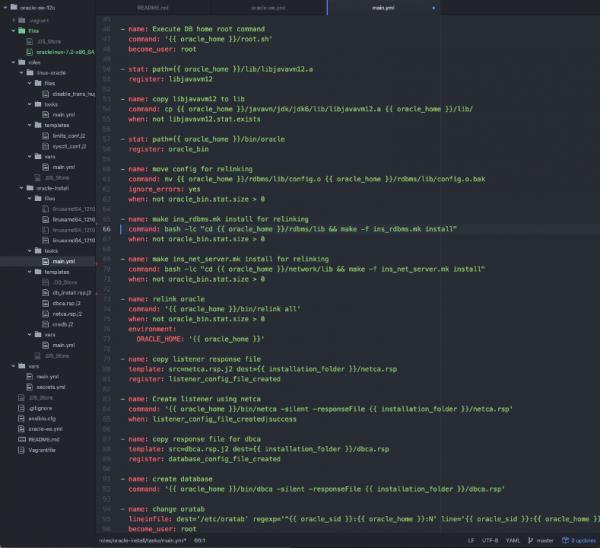
You can see the Ansible tasks I did to get Oracle DB 12c EE installed on Oracle Linux 7 in my vagrant-experiments GitHub repo.


Leave a Reply